How GoBLAM CS2 tournaments work
How scoring, tickets and prizes work, and how to get into your server on match day.
How a GoBLAM tournament works
You enter on your own and play CS2 matches on a team. Round wins and kills earn points, the lowest scores are eliminated, and prizes go to the top finishers.
Both modes
Who you kill matters.
Beating an opponent with a higher GoBLAM rating earns more points. A lower-rated opponent is worth fewer points. Your rating updates after every kill and death.
Scoring and elimination
Our usual mode
Creeping Death
Start at zero and build your score. Kills and round wins earn points; deaths don’t cost points. Scheduled cuts remove the lowest scores.
Occasional tournaments
Go for Broke
Everyone starts with the same points. Kills and round wins add points; deaths and round costs take points away. Round costs can rise. At zero points or fewer after a round, you’re eliminated.
Before you enter, check Scoring mode in the tournament page’s Match briefing for that event’s rules.
In-game HUD
What the GoBLAM HUD shows during a match
The Cut Watch bar sits above your health and ammo, so you can follow the next cut without leaving CS2.

Status
SAFE while you are clear of the next cut. CUT ZONE when that cut would eliminate you, or one bad round could take you to zero.
Balance
Your balance now, the last change, and what caused it.
On this server
Your place among the players still in on your server.
Next cut
Which level’s cut is next, when it runs, and how far above it you are, or how much you need to reach safety.
Example: the bar shown on a frame from an earlier match, with that player’s values.
Ready to put the rules into practice?
Choose a role for your skill level, help your team win rounds and build your own score.
Read the strategy guideTickets and prizes
Silver, Gold and Cash Tournaments
Start in a free Silver Tournament and win Silver Tickets. Those qualify you for Gold Tournaments, where you can win Golden Tickets to enter Cash Tournaments with euro prizes. Each tier is named after its prize, not its entry: some Gold and Cash Tournaments are free promotions.
Tickets are not money. Prizes are.
Tickets only get you into tournaments, and they cannot be paid out. You can buy Silver Tickets in Ticket Bundles where available. Golden Tickets cannot be bought; you have to win them. Euro prizes from Cash Tournaments go to your prize balance, and a Prize Payout transfers them to your bank account.
Prizes are fixed up front
Every tournament shows its prizes and how many places are paid before you enter, and they are fixed once it opens. GoBLAM pays for the prizes, so entries do not add to them. If a tournament does not reach its minimum number of players, it does not run and your entry tickets are returned.
Run the match-day check
Already entered? Run through this before the start so you can join your server quickly.
Keep the live tournament page open before the scheduled start.
Make sure your CS2 client is up to date.
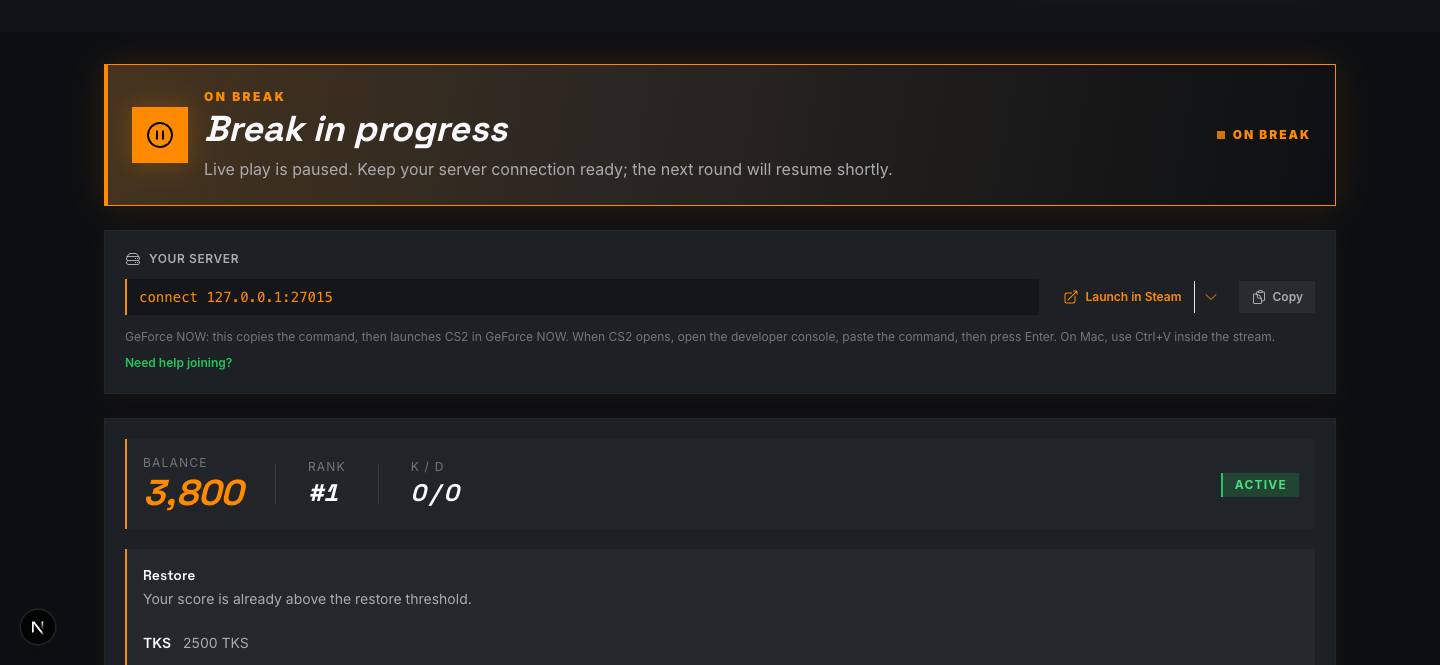
Steam: use Launch in Steam when your assigned server appears.
Phone companion: scan the QR code for quick access, or use the Home Screen app for full-screen repeat use.
Stay signed in with the GoBLAM account that entered the tournament.
Keep your play device ready; the server card can appear close to start time.
Steam
Join from Steam on PC
When your server is ready, click Launch in Steam. CS2 opens and connects you automatically, with no console commands.
Open the live tournament page before the start time.
When your server appears, choose Launch in Steam.
Accept the browser or Steam prompt if one appears.
CS2 opens and connects to your assigned GoBLAM server.
Second screen
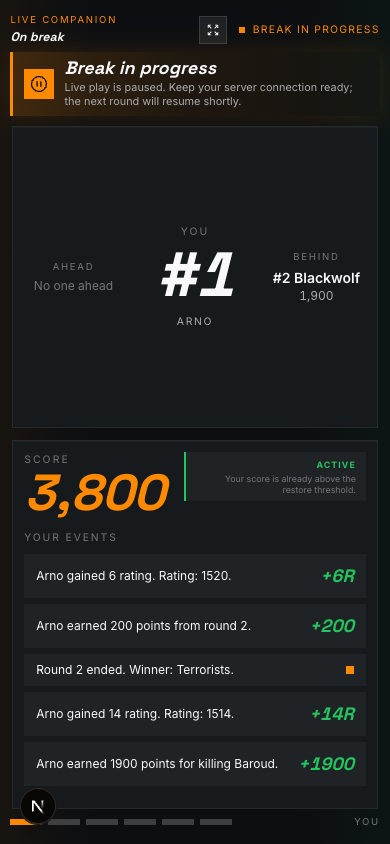
Use your phone as live companion
Follow your rank and points on your phone while CS2 is full screen. Scan the QR code for quick access, or add the app to your Home Screen.
Fast QR path: scan the live page QR code to open the current tournament view quickly on your phone.
Saved app path: on iPhone, open GoBLAM in Safari, tap Share, choose Add to Home Screen, keep Open as Web App on, then tap Add.
Launch GoBLAM from the Home Screen when you want the full-screen companion. iOS will still open future QR scans in Safari.
Sign in if asked, then open the live tournament page and tap Start companion.
Use the phone for live standings, score changes, restore windows, and extra-life status while CS2 runs on your play device.
QR companion
Best at match time: it opens the current live view from desktop on your phone. On iPhone Safari, portrait usually leaves more usable space.
Home Screen app
Best for repeat use: it removes Safari controls and launches from the icon. On Android or the Home Screen app, rotate to landscape for the widest companion view.
Use the live page as your tournament dashboard
Keep the live page open on a second screen or your phone. It shows your rank, points, rating and available actions while you play.
Leaderboard
Track your rank, nearby contestants, and how many people are still active.
Balance
Your in-game score, separate from your ticket wallet. Watch your points, rank and elimination status on the live page.
Rating
Updates after every kill and death, and changes how many points each opponent is worth.
Rank & rating graph
Shows how your rank and rating have moved during the tournament.
Live feed
Kills, eliminations and rating changes as they happen, so you can see why the leaderboard moved.
Actions
Some tournaments offer optional Top Ups and extra lives. Check the cost and rules before you buy.
Keep the desktop live page open on a second monitor, laptop, or browser window when you can.
If CS2 is full screen, use the phone companion and swipe between You, Leaderboard, Level, Rank graph, Teams, and Connection.
Between rounds, check your rank, points and available actions.
Ready to enter?
Start with a free tournament, and open the live page a few minutes before it starts.
Explore completed tournaments, final standings and player profiles.
See past tournament resultsOpen a player’s public profile from the rating leaderboard to see their recent results.
Compare CS2 player ratingsOfficial references